
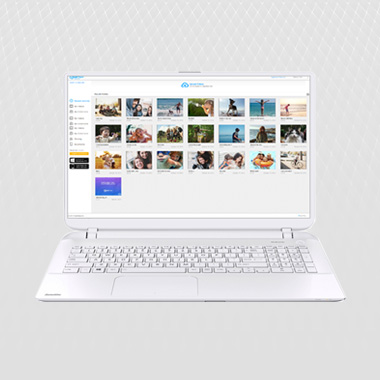
Now called RealTimes, RealPlayer for PC has evolved into much more than just a media player. It is still the best way to play and manage all of your video content on your PC, download web videos from popular sites like YouTube and Vimeo, convert videos to other formats and burn music to a CD – now with a whole lot more:
Download free

You've got all these great pictures and videos sitting around on your devices, but what are you going to do with them all? RealTimes Stories are magical montages automatically made from your photos and videos – no work required! It picks out your best moments, so you don't have to. Go in and tweak them, add in your favourite soundtracks and filters, and make sure to share them with friends!
Learn More Get free apps
Keep your smartphones, tablets and HDDs lean without losing your moment. If you record countless GBs at a concert, just upload the clips to RealCloud using RealTimes and access them anywhere you want. Now all your devices have plenty of room for music and apps, and you get to keep showing off your best moments.
Learn More

Want to show your friends a video from your phone without having to pass it around? You can use the RealTimes app on your Xbox One, Kindle Fire TV or Roku, or cast with Chromecast to view everything on your TV. No converting files, no massive load times, no wores, no laggy playback - just the big screen, the audience and hopefully some popcorn.
Learn More
Hard drives crash, phones can be lost, but your memories don't have to go too. With RealTimes you can back up your videos online to RealCloud for peace of mind, and access them anytime - you can even set it to do it automatically if you want! Your files auto-format so you can view them on any device, so all you have to do is relive the moment.
Learn More

You don't always want to broadcast everything – RealTimes lets you send photos, videos, and montages privately with one friend, or a group. Use SMS, Twitter, email, Facebook, or even just paste a link in your chat. Whatever you do, RealPlayer® will auto-format your files for any device and any screen, so your friends and family can instantly watch. They don't even need the app!
Learn More
There are some online videos you just can't live without - like that "How-to tie a bow-tie" video that got you through a summer of weddings. Your library of funny cats when you're feeling blue. With RealTimes for desktop PC you can download and store your favourites with one click. You never know when you might need them!
Learn More

You're always on the go - isnt it time that your photos and videos followed? When you upload your photos and videos to RealCloud you can access them on just about any device and with RealTimes app on all of your devices you can keep the kids entertained with cartoons on road trips and keep yourself occupied during commutes and long trips - even when there is no WiFi. Dont worry - time flies when you are entertained
Learn More
Share whole "live Albums" with friends and family. Whenever you add photos and videos to a Live Album, everony who subscribes to it gets notified, so they can enjoy the new memories right away.
Learn More

Why work to view your videos? If you have multiple devices with RealTimes on the same WiFi networks, you can drag and drop them from one place to another withoutt uploading or downloading. Our RealPlayer technology auto-converts the format, so they play on every device you have.
Learn More
Seriously, how many gigs of media do you have anyway? Its hard to keep them sorted, but RealTimes organises them into customizable Albums. This way, you can keep your family videos separate from videos of yourself practicing breakdancing.
Learn More

The beauty of RealTimes is that it instantly and automatically creates amazing Stories from your photos and videos - but you can still hit the "remix" button to make it use different clips and photos, in different orders until you're happy with it. Or if you're a real director, you can customize your Stories to add titles, new transitions and filters and even choose music to really set the mood! Tell your story your way!

RealTimes has 2 premium plans to choose from that offer you more space, better quality video, a bigger choice of music and the ability to create unlimited RealTimes of any length with any music track!
You will also get access to all of the premium features of RealPlayer for PC. These include high quality streaming and playback – allowing you to play HD videos and a bigger range of file-types on your PC and enjoy HD streaming on your TV if you have Roku or Chromecast.
You can also burn HD DVDs and take advantage of Rinse Music Cleaner.
Get RealTimes Premium


